Networking Development Engineering
  • HOME
  • SOLUTIONS
  • USE CASES
    • From question to ticket
    • Continuous Analysis
    • Inventory Sync
    • Device Onboarding
  • CONTACT US
  • BLOG
  • FlowWeaver
  • More
    • HOME
    • SOLUTIONS
    • USE CASES
      • From question to ticket
      • Continuous Analysis
      • Inventory Sync
      • Device Onboarding
    • CONTACT US
    • BLOG
    • FlowWeaver
  • Sign In

  • My Account
  • Signed in as:

  • filler@godaddy.com


  • My Account
  • Sign out

Signed in as:

filler@godaddy.com

  • HOME
  • SOLUTIONS
  • USE CASES
    • From question to ticket
    • Continuous Analysis
    • Inventory Sync
    • Device Onboarding
  • CONTACT US
  • BLOG
  • FlowWeaver

Account

  • My Account
  • Sign out

  • Sign In
  • My Account

AI builds the workflow. A deterministic engine runs it.

FlowWeaver canvas showing the DNS Audit workflow: dns-reconcile, send-report-email and notify-failur

FlowWeaver turns operational intent into multi-vendor workflows your team can see, simulate and approve before anything touches production.
Request a demo

Why network teams choose FlowWeaver

Deterministic execution

Verified before production

Verified before production

AI helps you build. It never runs in the execution path, so the same workflow behaves the same way every time.

Verified before production

Verified before production

Verified before production

Every version must pass simulation and human approval before it can run against production devices.

Multi-vendor by design

Self-hosted, your own LLM

Self-hosted, your own LLM

SSH, NETCONF, SNMPv3, REST, Ansible, Python and GitOps in one workflow.

Self-hosted, your own LLM

Self-hosted, your own LLM

Self-hosted, your own LLM

Runs on your infrastructure. Connect OpenAI, Anthropic, Gemini, DeepSeek, Kimi or a local model through Ollama.

Scripts break in production. Chatbots shouldn't push config.

FlowWeaver takes a third path.

Network automation usually fails one of two ways: scripts only their author can maintain, or AI tools that act on the network with no audit trail. With FlowWeaver the assistant helps you design the workflow, and the workflow itself is a visible graph that runs identically every time, with every step logged and every change approved.

From intent to production in five controlled steps

01 · Describe

01 · Describe

01 · Describe

Tell the assistant what you need in plain English, such as "list active devices from NetBox and email a CSV report."

02 · Build

01 · Describe

01 · Describe

The assistant drafts the workflow on the canvas: steps, targets, and success and failure paths. Edit any node by hand.

03 · Simulate

01 · Describe

03 · Simulate

A simulation validates the graph and is bound to that exact version. Change a node and it has to pass again.

04 · Approve

04 · Approve

03 · Simulate

Promote from Draft to QA to Production. Production requires the right role and a human approval.

05 · Run

04 · Approve

05 · Run

The engine executes step by step with live status, per-step logs, retries and a complete audit trail.

A canvas that shows the whole logic

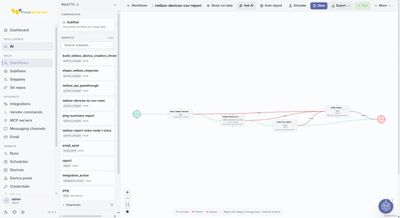
Every workflow is a graph you can read at a glance, with explicit success and failure paths.

  • Reusable snippets: Python, Ansible, REST calls and data transforms.
  • Subflows: call another workflow as a single step.
  • Versioned: import, export and sync with Git.

FlowWeaver workflow canvas for netbox-devices-csv-report, with each step and its success and failure

Build with AI. Run with certainty. Govern everything.

An assistant with guardrails

Governance built in, not bolted on

An assistant with guardrails

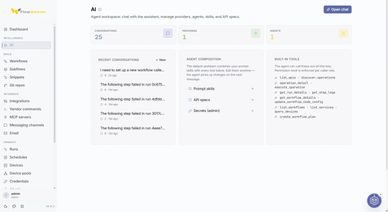
FlowWeaver AI workspace with saved conversations, the selected model provider and the agents and bui

Ask AI from the editor. The assistant reads run logs, explains failures, proposes fixes and edits the workflow for you to review.


Permission tiers: each tool call is checked against the user's role.


No victory until verified: a workflow is ready only after its current version passes simulation.


Never in production: the assistant builds; the engine executes.
Request a demo

Runs you can audit

Governance built in, not bolted on

An assistant with guardrails

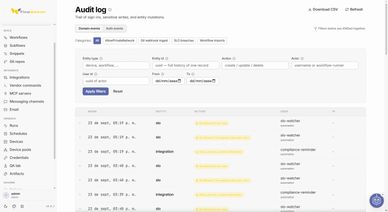
FlowWeaver audit log listing every run and change, filtered by date, user and action

Follow every run on a live graph. Open any step to see its logs and its input and output payloads.


Schedules and triggers: run on a timer, on demand or from a webhook.


Reports: CSV and HTML output delivered by email or chat.

Governance built in, not bolted on

Governance built in, not bolted on

Governance built in, not bolted on

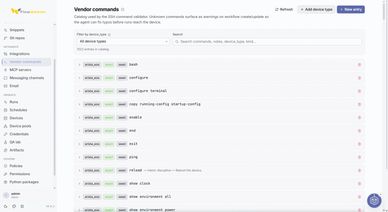
FlowWeaver vendor command catalog, where administrators define which CLI commands each vendor and ro

Administrators set the rules once and FlowWeaver enforces them on every workflow, run and AI action.


Role-based access for building, approving and running.


Global policies as guardrails across all workflows.


Audit log of every change and every assistant action.

Works with the stack you already run

Devices

Source of truth & ITSM

Source of truth & ITSM

Cisco IOS XE, Juniper Junos, Arista EOS, Nokia SR Linux and any device reachable by SSH, NETCONF, SNMPv3 or REST.

Source of truth & ITSM

Source of truth & ITSM

Source of truth & ITSM

NetBox, Infoblox and ServiceNow, plus any REST API through integrations.

Code & GitOps

Source of truth & ITSM

Code & GitOps

Git repositories, webhooks, and workflow import and export.

Messaging

Agents & tools

Code & GitOps

Slack, Microsoft Teams, Telegram, WhatsApp and email.

AI providers

Agents & tools

Agents & tools

OpenAI, Anthropic, Google Gemini, DeepSeek, Kimi, Ollama (local) or a custom endpoint.

Agents & tools

Agents & tools

Agents & tools

MCP servers and reusable skills extend what the assistant can do. Third-party names are used for identification only.

Workflows in production today

Device Onboarding

Device Onboarding

Device Onboarding

Validate a device before it's written to your source of truth, so bad data never gets in.

Learn More

Inventory Sync

Device Onboarding

Device Onboarding

A closed-loop audit that reconciles your systems of record with what's actually on the network.

Learn More

OS Compliance

OS Compliance

OS Compliance

Check OS versions on Arista, Juniper and Cisco against policy and open ServiceNow tasks for the gaps.

Your use case

OS Compliance

OS Compliance

Bring a task your team repeats every week. We'll show you what it looks like as a verified workflow.

Request a demo

Runs inside your perimeter

FlowWeaver is self-hosted. Your devices, credentials and data stay on infrastructure you control, and each installation serves a single organization.


✓ Deploy and operate in an environment you control.
✓ Support environments with limited or no external connectivity.
✓ Protect sensitive information with security controls.
✓ Apply safeguards to integrations and automated actions.
✓ Manage access and maintain a record of activity.

Explore FlowWeaver

Frequently Asked Questions

Please reach us at contact@networkingdev.com if you cannot find an answer to your question.

No. The assistant helps you build and fix workflows. Execution is handled by a deterministic engine with no language model in the path, and production runs require a verified, approved version.


Your own. FlowWeaver supports OpenAI, Anthropic, Google Gemini, DeepSeek, Kimi, local models through Ollama, and custom endpoints.


No. FlowWeaver is self-hosted on your infrastructure, and each installation serves one organization.


Not for most workflows: the assistant and the canvas handle them. When you need custom logic, add a Python, Ansible or REST snippet.


FlowWeaver is open source under the Apache License 2.0. The code is on GitHub: github.com/Isaza-Labs/flow-weaver.


Copyright © 2026 NetworkingDev - All Rights Reserved.
Nashira and FlowWeaver are products of Isaza Labs LLC. 

This website uses cookies.

We use cookies to analyze website traffic and optimize your website experience. By accepting our use of cookies, your data will be aggregated with all other user data.

DeclineAccept