Networking Development Engineering
  • HOME
  • SOLUTIONS
  • USE CASES
    • From question to ticket
    • Continuous Analysis
    • Inventory Sync
    • Device Onboarding
  • CONTACT US
  • BLOG
  • FlowWeaver
  • Más
    • HOME
    • SOLUTIONS
    • USE CASES
      • From question to ticket
      • Continuous Analysis
      • Inventory Sync
      • Device Onboarding
    • CONTACT US
    • BLOG
    • FlowWeaver
  • Iniciar sesión

  • Mi cuenta
  • Iniciaste sesión como:

  • filler@godaddy.com


  • Mi cuenta
  • Cierra sesión

Iniciaste sesión como:

filler@godaddy.com

  • HOME
  • SOLUTIONS
  • USE CASES
    • From question to ticket
    • Continuous Analysis
    • Inventory Sync
    • Device Onboarding
  • CONTACT US
  • BLOG
  • FlowWeaver

Cuenta

  • Mi cuenta
  • Cierra sesión

  • Iniciar sesión
  • Mi cuenta

From a network question to a ticket someone can act on.

One continuous Nashira session, in the order it happened — including the part that failed.

Ask Nashira what is happening. It checks the device is in inventory and reachable, runs the read-only commands, brings the output back into the conversation — and when the next step changes a system outside the chat, it stops and asks you first.
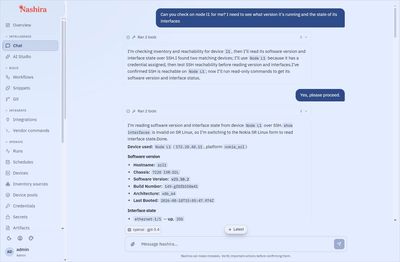
Nashira conversation: the operator asks about Node L1; Nashira states its plan, waits for approval,

One request, one traceable path.

1 — Ask

2 — Inspect

2 — Inspect

"Can you check on Node L1? I need to see what version it's running and the state of its interfaces." No command, no syntax, no device path.

2 — Inspect

2 — Inspect

2 — Inspect

Nashira confirms the device is in inventory with a credential, tests reachability, then runs the read-only commands for that platform and returns the output.

3 — Correct course

3 — Correct course

3 — Correct course

When a command is rejected by the device, Nashira shows the error it got, explains why, and proposes the syntax that platform actually uses.

4 — Hand off

3 — Correct course

3 — Correct course

The finding becomes a ticket. Nashira shows the exact content first and waits — writing to a service desk happens outside the chat, so it needs your word.

The conversation carries the evidence.

The answer is not detached from the work that produced it.

What was called, with which arguments and what came back sits next to the sentence written from it.


The operator types one sentence — "Can you check on node l1 for me? I need to see what version it's running and the state of its interfaces" — and names no command, no syntax and no device path.


Nashira states what it intends to do before it does it, and waits. The inventory held two devices matching "l1", so it says which one it picked and why — the one with a credential assigned — instead of choosing silently.


It checks before it trusts: inventory says the device exists; the reachability check says it answered in 2 ms. Every call is accounted for: the reply ends with a ledger of what ran — show version succeeded, show interfaces failed as invalid on SR Linux. The version, chassis, build and interface state that come back are the device's own output, not a summary of it.


Ask, plan, approval, execution and raw device output — in one screen, in that order.

Nashira conversation: the operator asks about Node L1; Nashira states its plan, picks the device wit

The first command failed. That is in here too.

What I could not get

A section headed "What I could not get", the parser error quoted verbatim, and a per-command ledger: show interface succeeded, show lldp neighbor failed.

It looked up the right command

It did not guess. It asked the catalogue for platform nokia_srl, intent show_lldp_neighbors, got the command back, and ran that.

Why we left this in.

This is one continuous session, not a highlight reel.

An assistant that invents an answer when a command fails is worse than no assistant, because you cannot tell the two apart. Here the failure is visible, the parser error is quoted, every call is listed with its outcome, and the recovery is not a guess: Nashira queried the command catalogue by platform and intent, got the correct syntax back, and ran that. The catalogue in the next section is not a feature on a list — it is what fixed this.

One intent. The right command for each platform.

"Show me the LLDP neighbors" is not a command — until Nashira knows what the device is.

It becomes one only once Nashira knows what the device is — which is exactly the lookup you just watched it make.

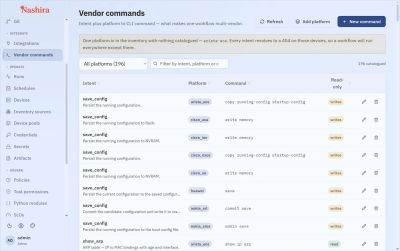
The catalogue maps an operational intent plus a platform to the CLI command that expresses it. In the previous section you saw it called by name — platform nokia_srl, intent show_lldp_neighbors — and return the syntax that box accepts.

Every entry is classified read or write before it can be used, and that classification is what the permission and confirmation rules act on. A read runs; a write asks.

The banner at the top of that screen is not staged. Nashira is reporting that one platform present in the inventory has nothing catalogued yet, so intents will resolve to a 404 on those devices. We left that in as well.

196 commands across eight platforms, each tagged read or write — including the warning that one platform is not covered.
Ask it once in chat. Repeat it as a deterministic workflow.

A one-off diagnostic belongs in the conversation. The same check on a schedule belongs in a workflow

Once stored, a Nashira workflow runs the code it was built with. It is not re-planned by a language model on each execution, and it does not consume model tokens unless a step deliberately calls one.

The run keeps the workflow it came from, who started it, the environment it ran in and the outcome of every step — so a result can be defended later without running it again.

Explicit steps: what was prepared, executed, collected and saved, in order, with the output of each step. Controlled lifecycle: a workflow is simulated and tested before it is promoted through its environments to production. Inspectable outcome: changed, unchanged, failed and skipped stay distinguishable — "it ran" and "it changed something" are not the same claim.

A real run in production: seven steps, four changed, none failed, seven seconds.

Nashira run details for a device-version report workflow in production: completed, seven steps, four

It shows you the ticket before it opens it.

What I will do

"What I will do", field by field, and "Reply confirm and I'll create the ticket". The operator replies "confirm".
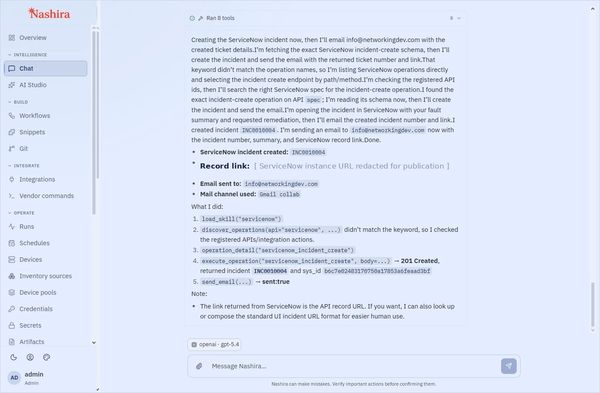
INC0010004 created

aNashira reports ServiceNow incident INC0010004 created with 201 Created, the email sent, and a ledg

Incident INC0010004, 201 Created, mail sent — and a ledger of the five calls it took, including the discovery call that missed first.

Reading and writing are different operations.

"I need your confirmation first."

"These are two state-changing actions outside the chat, so I need your confirmation first." Nashira's own words, before it wrote anything.

Getting there took a wrong turn too: the first discovery call did not match the operation name, so Nashira listed the registered API actions, found the right one, read its schema and only then wrote. The tool row counts the miss — six tools, one failed — rather than hiding it.

The service desk here is a configured ServiceNow instance reached through a registered REST operation. In your environment, the integration, its credentials and the operations it permits are yours to define.

Having opened the incident, Nashira offered to raise a change request for the remediation, because enabling ports and recabling is an actual network change. Recording a problem and authorising a change are not the same act.

One precision that matters. An LLDP neighbor is an observed fact. Calling it a miswiring needs something to compare it against — and in this session that reference came from the operator, who stated the expected leaf-spine topology in the request. Nashira reported what it saw and judged it only against the intent it was given. It does not infer that a link is wrong on its own.

What the ticket carried

  • Device, address and platform version
  • The LLDP adjacencies actually observed
  • The intended topology, as the operator stated it
  • The ports found administratively disabled
  • The remediation being requested
  • Category, impact and urgency for the service desk

See what ran, who started it and what changed.

Runs, traces and audit entries are three views of the same operation.

A polished answer is not evidence. The record is.

Audit entries can be filtered by entity, action, actor, request and date, so a question asked weeks later — who changed this, and on whose authority — has an answer that does not depend on anyone's memory.

Every governed action is written to a trail chained from its first entry, so an alteration or a gap in the history is detectable.

The audit view, filtered the way a reviewer would filter it.

Nashira audit view listing governed actions with filters for entity, action, actor, request and date

From fragmented troubleshooting to one governed path.

The usual way

The usual way

The usual way

  • Find the device in one system
  • Open a terminal and recall the right vendor syntax
  • Correlate interface and neighbor state by hand
  • Retype the finding into a ticket, and again into an email
  • Reconstruct later who ran what, and from where

With Nashira

The usual way

The usual way

  • Start from the operational question
  • Use the inventory, command catalogue and connections already configured
  • Keep the source output and its interpretation together
  • Approve the ticket text once, and let it be written where it belongs
  • Keep the run, the trace and the audit entry

Bring one real diagnostic case. If something fails on the way, you will see that too.

Book a demo


Copyright © 2026 NetworkingDev - All Rights Reserved.
Nashira and FlowWeaver are products of Isaza Labs LLC. 

Este sitio web utiliza cookies

Usamos cookies para analizar el tráfico del sitio web y optimizar tu experiencia en el sitio. Al aceptar nuestro uso de cookies, tus datos se agruparán con los datos de todos los demás usuarios.

RechazarAceptar